Adobe Firefly Video Editor: A New Era of Prompt-Driven Video Editing
Adobe has expanded Firefly beyond one-shot generation into a full-fledged, prompt-aware video editing workflow. The updated Firefly video editor lets creators refine clips with text prompts, adjust camera motion, tweak color and composition at the frame level, and leverage third-party models for enhanced upscaling and image generation. These changes aim to give editors more precision without rebuilding clips from scratch.
How does Firefly’s prompt-based video editing work?
At its core, the Firefly video editor combines two familiar paradigms: generative prompts and timeline-based editing. Instead of re-generating an entire clip when something is off, editors can now use natural-language instructions to alter specific elements. Typical workflows look like this:
- Enter a text prompt to modify visual elements (for example, “Change the sky to overcast and lower the contrast”).
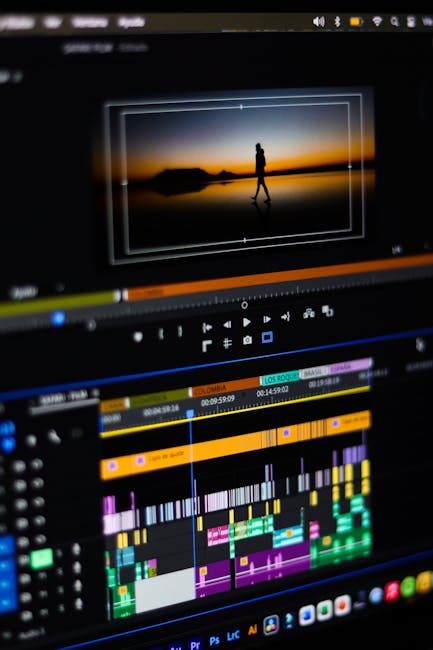
- Use a timeline view to select frames or ranges for targeted edits, sound adjustments, and transitions.
- Upload a start frame and a reference clip to replicate camera motion and apply that motion across the composition.
These capabilities let filmmakers, social creators, and marketing teams iterate faster. Instead of spending hours tweaking layer masks and keyframes for minor changes, you can instruct the editor with plain language and then fine-tune using the timeline controls.
What practical features does the new editor add?
The update introduces a handful of practical features that address long-standing friction in generative video work:
Prompt-targeted edits
Editors can target specific objects, colors, or moods with text prompts. Want to zoom slightly on the subject or mute the saturation of the background? Firefly accepts clear instructions and applies edits only where you specify, preserving unaffected frames.
Timeline view and frame-level controls
The timeline lets you:
- Select frame ranges for selective regeneration or stabilization.
- Adjust sound levels and clip timing directly in the editor.
- Layer multiple prompt-driven edits and compare results side-by-side.
Camera motion cloning
For complex camera moves, Firefly supports a reference-driven approach: upload a start frame and a short reference clip showing the intended camera motion, and Firefly will attempt to replicate that motion across your scene. This makes it easier to match kinetic visual language across shots without manual keyframing.
Third-party model integration
Firefly now supports a growing set of third-party generative models: image models for richer textures and style transfer, and video models for higher-fidelity upscaling. That includes models optimized for 1080p and 4K upscaling, helping creators produce distribution-ready masters from generative outputs.
Why this matters: efficiency, precision and creative control
The update addresses three common pain points in generative video:
- Speed: targetted edits reduce the need to re-generate entire clips, saving time and compute.
- Precision: natural-language editing plus timeline control grants fine-grained adjustments while keeping the simplicity of prompts.
- Quality: access to specialized third-party models improves final output for upscaling and image refinement.
For teams producing marketing videos, social verticals or concept previews, this combination of prompt-control and timeline tools translates into fewer iterations and higher-quality deliverables.
How will creators use upscaling and third-party models?
One of the biggest practical hurdles for generative video has been resolution. Low-resolution renders are fine for ideation, but deliverables often require 1080p or 4K. The Firefly editor addresses this by integrating dedicated upscaling models, allowing editors to:
- Generate a composition at a lower fidelity to iterate quickly, then upscale the final sequence.
- Use specialized image-generation models to refine textures and details within frames before upscaling.
- Combine model-specific strengths — for example, one model for realistic skin tones and another for crisp environmental detail — in a single pipeline.
These options make it easier to move from prototype to production without switching tools or exporting to separate upscalers.
How does Firefly compare to traditional video editors?
Traditional NLEs (non-linear editors) give precise control via keyframes and masks, but they require manual craft. Generative-first tools simplify creative changes with natural language but previously lacked fine-grained timeline controls. Firefly sits between those worlds: it preserves the speed and accessibility of text-driven edits while offering a timeline and frame-level adjustments that editors expect from professional software.
This hybrid workflow is particularly useful when you need creative experimentation first and pixel-level accuracy later.
Is Firefly suitable for professional pipelines?
Yes — with caveats. The updated editor is designed to integrate into existing workflows by enabling:
- Export-ready upscaling options for delivery formats (1080p, 4K).
- Reference-driven camera motion cloning for consistency across takes.
- Collaborative features that keep teams aligned during iteration.
However, teams with strict color-grading, VFX compositing or broadcast standards may still use Firefly in a concept-and-assembly role, then move to specialized tools for final color timing and finishing. That said, Firefly’s new features significantly reduce the gap between ideation and final production.
Can Firefly improve collaboration and review cycles?
Collaboration tools in the editor let teams create shared boards and review artifacts within the app. Anyone on the team can add notes, pin reference frames or suggest prompt edits — turning ad-hoc feedback into actionable instructions that the editor can implement. This reduces miscommunication and keeps creative intent tied to the actual video clip.
Quick checklist for collaborative review
- Upload reference examples and annotate desired motion or style.
- Assign prompt-based tasks (e.g., “reduce background contrast”) to specific reviewers.
- Use the timeline to lock approved segments before final export.
How does Firefly fit into the broader generative AI landscape?
Firefly’s move towards a prompt-driven editor reflects a wider trend: generative models are becoming tools for iterative production, not just one-off creations. As models improve, platforms that combine generation with proven editing metaphors (timelines, keyframes, references) will win adoption among professionals. For background reading on model-driven tools and studio workflows, see our coverage of generative image and video advances and related production tools, including the GPT Image 1.5 improvements and work on generative world models such as Runway GWM-1.
What are common use cases and who benefits most?
Firefly’s updated editor benefits a wide range of creators:
- Social creators who need fast iterations and platform-ready resolutions.
- Marketing teams producing multiple ad variations from a single concept.
- Filmmakers prototyping camera moves and visual treatments before full production.
- Design teams who want image-level refinements without leaving the generative environment.
Teams that combine sound design with generative visuals will find value in integrating Firefly with audio-first workflows — for example, using audio edit platforms or soundtrack tools to sync sound with the Firefly timeline. For approaches to audio and soundtracks in generative video workflows, see our piece on AI video soundtracks.
How to get started: practical tips for first projects
Here are pragmatic steps to incorporate the Firefly video editor into your process:
- Prototype at low resolution: iterate quickly with prompts to lock composition and motion.
- Use reference clips for camera motion you want to replicate across scenes.
- Apply targeted prompts for color and object tweaks instead of re-generating full clips.
- When satisfied, apply a dedicated upscaling model to render final masters in 1080p or 4K.
- Use collaborative boards to collect feedback and freeze approved ranges on the timeline.
Following this flow helps teams move from experimentation to polished assets with fewer bottlenecks.
What limitations should editors expect?
While the new editor represents a big step forward, there are realistic limits:
- Complex VFX and exact pixel-level compositing still benefit from specialized tools.
- Model-specific artifacts can appear when mixing outputs from different generative engines.
- Performance and render times vary depending on resolution and the models used for upscaling.
Knowing these constraints helps you decide which parts of the pipeline to keep in Firefly and which to hand off for finishing in traditional compositors.
Final thoughts — is prompt-driven editing the future?
The expansion of Firefly into a timeline-aware, prompt-driven video editor signals a broader industry pivot: generative tools are maturing into production-capable systems that respect editors’ need for precision and collaboration. By marrying text-based instructions with timeline controls and third-party model integrations, Firefly reduces iteration time and opens new creative possibilities for teams and independent creators alike.
If you want a practical next step, try a small project using the workflow above: prototype at low resolution, lock camera motion with a reference clip, apply targeted prompts, then upscale the final composition. You’ll quickly see how much faster you can move from idea to export-ready video.
Ready to transform your video workflow?
Try Adobe Firefly’s new video editor to speed iterations, maintain control, and deliver higher-quality outputs. Start a project today, test prompt-based edits on a short clip, and compare the results to your traditional pipeline — then scale up once you’ve found the right balance between speed and fidelity.
Call to action: Sign in to Firefly, upload a short clip, and experiment with a prompt-driven edit — then share your results with our community to compare tips and best practices.